> ## Documentation Index
> Fetch the complete documentation index at: https://docs.gladecore.com/llms.txt
> Use this file to discover all available pages before exploring further.
# Pro: Grammar Presets
Constrain the LLM’s output format at decode time - no regex needed.
To enable and adjust **grammar preset** settings, go to: `UNPCPersonalityData → Pro Features | Grammar` .
 ### **Settings**
* **Enable Grammar (Pro)** - Master toggle
* **Grammar Preset** (Dropdown)
* **None** - Disabled
* **Dialogue – NPC (no markdown)** - Blocks \*, #, >, bullets, tables. *Recommended default*
* **Short Sentence** - Exactly one sentence
* **Yes or No** - Output is strictly “yes” or “no”
* **Emotion-Tagged Dialogue** -\
Output starts with: emotion: \ + dialogue\
(Word restricted to 8 states; parse first line for animation)
* **JSON Object** - Output must be valid JSON
* **Custom (raw GBNF)** - Define your own grammar
* **Custom Grammar (GBNF)**\
Only visible when **Custom** is selected
* **Grammar First**\
Off by default (faster). Enable only if every token must strictly match from position 1.
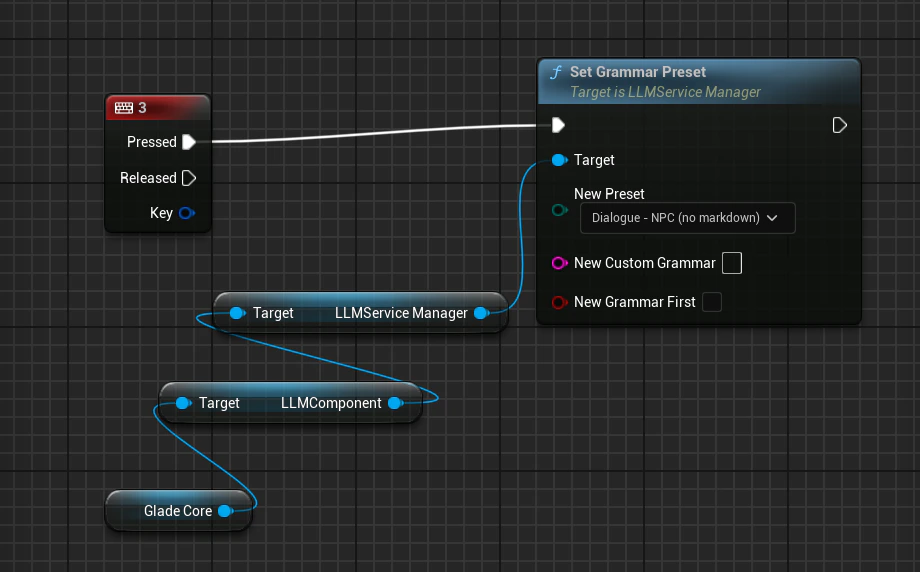
### **Runtime Override (Blueprint)**
### **Settings**
* **Enable Grammar (Pro)** - Master toggle
* **Grammar Preset** (Dropdown)
* **None** - Disabled
* **Dialogue – NPC (no markdown)** - Blocks \*, #, >, bullets, tables. *Recommended default*
* **Short Sentence** - Exactly one sentence
* **Yes or No** - Output is strictly “yes” or “no”
* **Emotion-Tagged Dialogue** -\
Output starts with: emotion: \ + dialogue\
(Word restricted to 8 states; parse first line for animation)
* **JSON Object** - Output must be valid JSON
* **Custom (raw GBNF)** - Define your own grammar
* **Custom Grammar (GBNF)**\
Only visible when **Custom** is selected
* **Grammar First**\
Off by default (faster). Enable only if every token must strictly match from position 1.
### **Runtime Override (Blueprint)**