

Swapping NPCs in Scene
The first section below covers UI NPC Swapping. If you have Open World NPCs, skip to the Open World NPC Swapping section.UI NPC Swapping
Can be triggered on events, buttons, etc. using the functions withinNPCUIOnlySwitcher. Use SelectNPCByIndex then use the index from the roster applied in NPCUIOnlySwitcher.
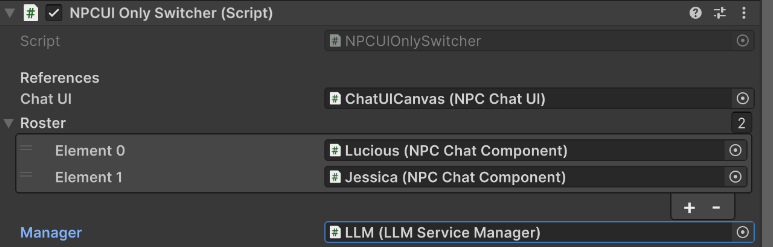
NPCUIOnlySwitcher .

Open World NPC Swapping
NPC Swapping for Open World NPCs is covered by thePlayerNPCInteractor. Make sure to set the layer mask of each NPC to the same in the PlayerNPCInteractor.

Resetting Context
The section below on Context Resets applies to both UI Only NPCs and Open World NPCs.Manual Context Resets
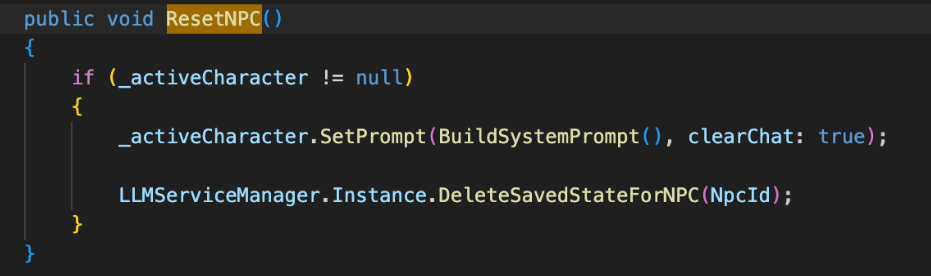
UseResetCurrentNPC if you are inside or using the UI as it will also clear the chat visuals.

ResetNPC function which is not tied to the UI from NPCChatComponent as it rebuilds the system prompt from scratch and clears the chat.
Overfill Context Options
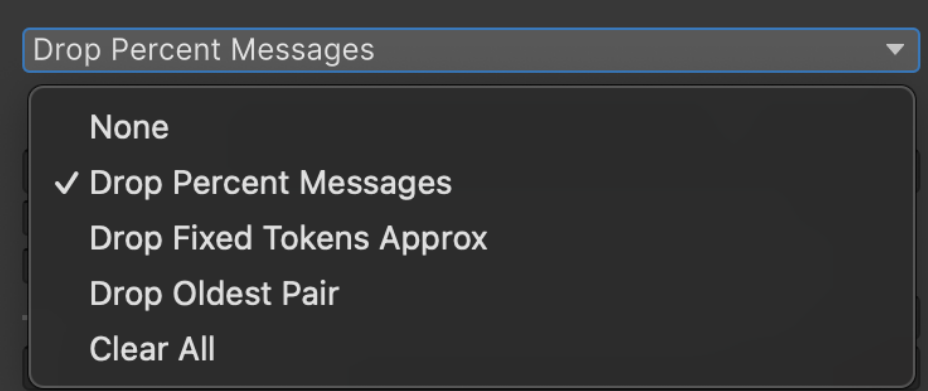
Context needs to be managed when it gets to a context size that would not fit anymore messages. Choose a reset policy that fits your needs and edit the available options.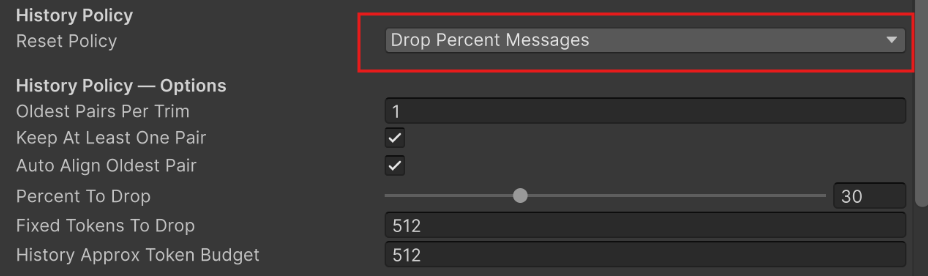
Note on Open World Context Resetting
Context Resetting is currently only covered by persistence conversations and overfill context policy. We have not tested context reset policies extensively enough to say our reset functions support all use cases of Open World NPCs.
Custom Input Template
If you do not want to use our custom model trained by Glade with our emotion sliders just load your own model in the LLM Prefab or Gameobject with the LLM script on it and disable the custom template on eachNPCChatComponent you use on your characters (see the reference below of what to turn off). Once that is off you can ignore the sliders and use your own model.
