
Documentation Index

Fetch the complete documentation index at: https://docs.gladecore.com/llms.txt

Use this file to discover all available pages before exploring further.

The Actions section on the LLM component controls how action calls emitted by the model are played back. Auto-Play Action Montages automatically triggers the bound AnimMontage when the model invokes an action. Target NPC Actor and Target Mesh (override) let you redirect playback to a specific actor or skeletal mesh.
UE Action Playback Settings Pro
Each action is a UGladeActionAsset with an Action Name (e.g. wave_hello), a natural-language Description the model sees when deciding whether to invoke the action, and an optional AnimMontage (AM_Wave) plus playback options: Montage Play Rate, Face Player First, and Face Target Seconds.
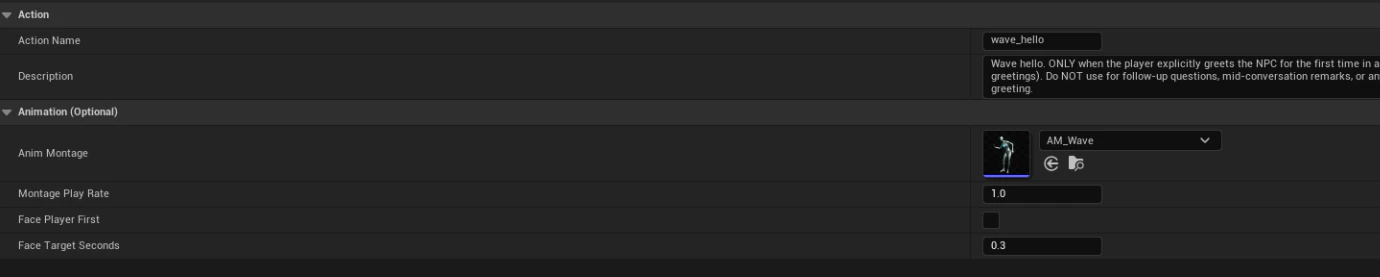
UE Action Definition Asset Pro
Below is an example Pro Features panel showing where to apply actions to NPC.
UE Apply Actionsto NPC Section Pro
The Pro Features section groups premium capabilities: Grammar (GBNF-constrained decoding), RAG, Output Retrieval, and Actions. Actions are configured as a list of UGladeActionAsset references with an Actions Enabled master toggle. Grammar (Pro) supports built-in presets or a Custom (raw GBNF) grammar string, with Grammar First controlling decode priority.
